Digital wardrobe
How to digitize your wardrobe without photographing every item
A digital wardrobe only helps if you finish enough of it to use it. The fastest route is often not a complete inventory. It is a small, accurate record of the outfits and pieces already doing real work in your life.
Published July 31, 2026 · 7 minute read
Short answer
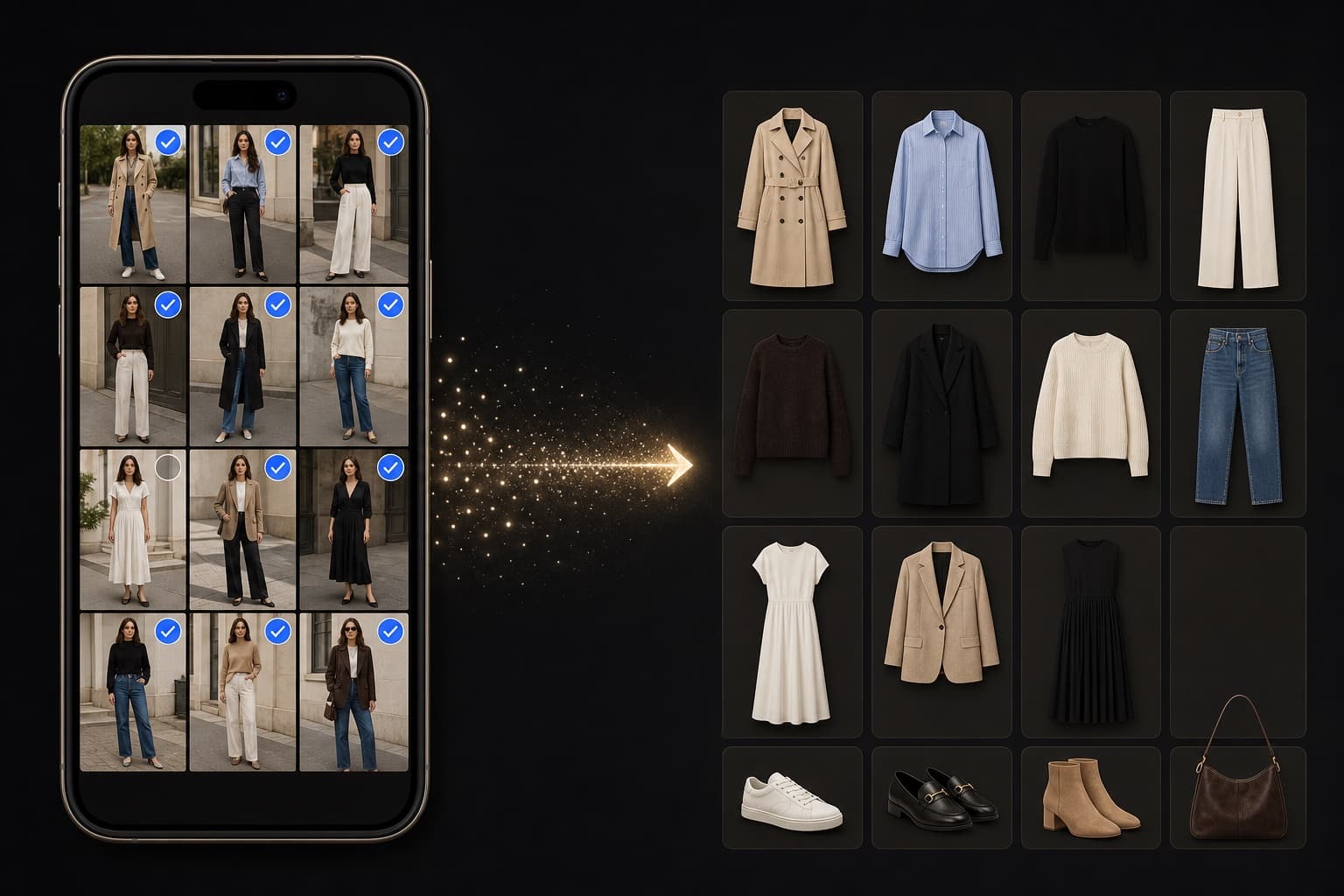
Start with 10–20 full-outfit photos from your camera roll. Let those looks create the first garment records, correct only the pieces you care about, and add missing clothes when you actually wear them. You will get useful outfit memory before you get perfect inventory—and that is usually the better order.
Decide what the digital wardrobe needs to answer
If the goal is resale, insurance, or a precise count, item-by-item photography may be worth the effort. If the goal is deciding what to wear, remembering good combinations, or seeing which clothes earn their space, outfit photos contain more useful context per image.
One mirror photo can record a top, bottom, shoes, outer layer, palette, occasion, and the fact that those pieces worked together. It will not reveal a shirt hidden at the back of a drawer, but it can make the wardrobe useful much sooner.
A 30-minute outfit-first setup
Use a bounded first session. Completion is not the goal; a trustworthy starting point is.
- 1
Choose 10–20 clear photos
Pick recent full-body or mirror photos where you are the only person in frame. Include ordinary days, work, weekends, and one or two occasions—not just your most polished looks.
- 2
Upload in a batch
Let the wardrobe tool identify repeated garments across the looks. Batch input reduces the stop-start friction of making one record at a time.
- 3
Correct the important mistakes
Fix duplicates, wrong categories, and the garments you wear often. Ignore tiny naming differences that do not change a future outfit decision.
- 4
Add one look when you wear it
From then on, the wardrobe grows as a side effect of getting dressed. An unseen garment enters the catalogue the next time it appears in an outfit photo.
What this method captures—and what it misses
Outfit-first setup is strongest at relationships: which trousers go with which shoes, which colours you repeat, what you wore to a real event, and which formulas survive outside a mood board. It also starts a wear history without asking you to reconstruct months of memory.
It is weaker at completeness. Seasonal pieces, occasionwear, basics worn under layers, and clothes you have not touched will be absent. That absence is information too: it separates the wardrobe you theoretically own from the wardrobe currently participating in your life.
When to photograph individual items
Add a clean item photo when a garment is difficult to recognize inside an outfit, when you want accurate resale details, or when an important unworn piece needs to be considered in planning. A hybrid wardrobe is usually more practical than insisting on a single capture method.
The useful test is simple: does adding this item help answer a decision you expect to make? If not, it can wait.
Frequently asked questions
How many photos do I need to start a digital wardrobe?
Ten to twenty varied outfit photos are enough for a useful first pass. The right number is the smallest set that represents your normal week, not a target for cataloguing everything.
Will an outfit photo identify every garment correctly?
No. Layers, occlusion, similar items, and poor lighting can cause mistakes. Review duplicates and frequently worn pieces, then let lower-impact details improve over time.
Is item-by-item cataloguing ever better?
Yes. It is better for exact inventory, resale, packing every possible option, or wardrobes where few outfit photos exist. Outfit-first setup is optimized for speed and real wearing context.